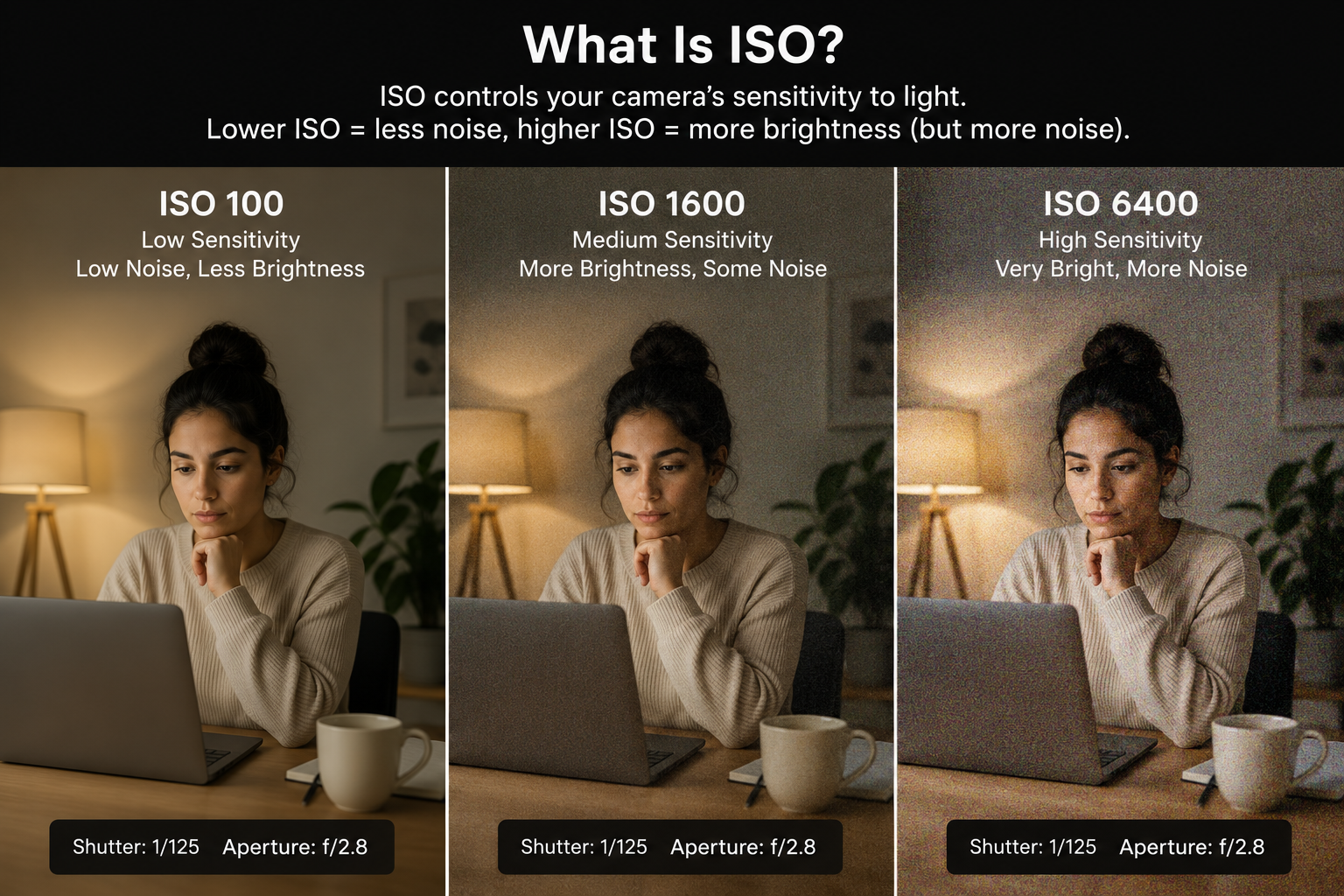
What ISO Means
ISO is a standardized scale that describes how sensitive your camera sensor is to light. The name comes from the International Organization for Standardization, which unified two older film sensitivity standards (ASA and DIN) into a single scale. In the digital era, ISO doesn't describe physical film grain — instead, it controls how much the camera amplifies the signal from the sensor.
Lower ISO numbers mean less amplification and less sensitivity. Higher numbers mean more amplification and higher sensitivity. The standard scale runs: 100, 200, 400, 800, 1600, 3200, 6400, 12800, and beyond. Each step doubles the sensor's sensitivity — ISO 400 is twice as sensitive as ISO 200 and requires half as much light for a correct exposure.
ISO sits alongside aperture and shutter speed as one of the three variables in the exposure triangle. While aperture and shutter speed have creative side effects (depth of field and motion rendering), ISO's primary side effect is image noise. Understanding when and how much to raise ISO is central to getting clean images in challenging light.
ISO and Image Quality
As ISO rises, digital noise increases. Noise appears as random variation in color and brightness across pixels — similar in appearance to film grain, but generally less aesthetic. At low ISOs, noise is barely visible even at 100% zoom. At high ISOs, it can significantly degrade fine detail, soften textures, and introduce color shifts — especially in shadow areas.
Noise comes in two forms: luminance noise and chroma noise. Luminance noise looks like fine grain and is relatively tolerable — it resembles film grain and can even add a tactile quality to images. Chroma noise (also called color noise) introduces random colored speckles — green, magenta, orange — and is more objectionable. Noise reduction tools in Lightroom and Capture One are good at reducing chroma noise but removing luminance noise tends to smear fine detail.
Sensor size matters enormously here. Full-frame sensors have larger individual photosites that collect more light, producing less noise at any given ISO. A full-frame camera at ISO 6400 may look cleaner than a smartphone at ISO 800. This is one of the primary real-world advantages of larger sensors.
Native ISO
Every sensor has a native ISO — the base sensitivity at which it captures data with the maximum signal-to-noise ratio and the widest dynamic range. For most cameras, this is ISO 100 or ISO 200. At native ISO, the sensor reads the charge from each photosite without amplification, giving you the cleanest, most detailed files possible.
Some modern sensors (particularly Sony and Nikon full-frame designs) feature dual native ISO. These sensors have two optimal sensitivity settings — typically a low one around ISO 100–200 and a higher one around ISO 800–1600. At the second native ISO, the sensor switches to a different amplification circuit that maintains low noise even at elevated sensitivity. The practical benefit is that you can shoot at ISO 800 or 1600 on these cameras with essentially no noise penalty compared to base ISO.
Extended ISO settings — the values below or above the camera's stated native range — are processed differently and often come with tradeoffs. Pulling to ISO 50 (below native) compresses the highlights and reduces dynamic range. Pushing to the highest extended ISOs produces images with significant noise that are often only usable for surveillance or documentation. Know where your camera's native range ends and the extended range begins.
When to Increase ISO
The practical rule is simple: raise ISO when you've opened aperture as wide as acceptable and slowed shutter speed as far as motion (or camera shake) allows. If you need more exposure and have no other variable left to adjust, ISO is the tool. A noisy image is almost always preferable to one that's blurry from motion or camera shake.
Indoor events are the most common scenario. A reception venue, a theater performance, a basketball game in a gymnasium — all of these require ISO settings that outdoor photography rarely demands. In these situations, don't be afraid of ISO 1600 or even ISO 3200. The result will be noisy, but it will be sharp and properly exposed. You can reduce noise in post; you cannot fix motion blur.
Auto ISO is a useful tool in run-and-gun situations. You can set a minimum shutter speed (e.g., 1/200s for moving subjects) and a maximum ISO (e.g., 6400), and the camera will choose the ISO needed to maintain your minimum shutter speed at your chosen aperture. This keeps images sharp while preventing the camera from going beyond your noise tolerance.
ISO Settings by Shooting Situation
Bright daylight — ISO 100 to 200. There's no reason to go higher unless you're intentionally shooting at very fast shutter speeds or very narrow apertures. Full sunlight at ISO 100, f/8, and 1/500s gives you a solid exposure with maximum image quality.
Overcast or open shade — ISO 200 to 400. Diffuse outdoor light is still bright enough to keep ISO low. This is the easiest light to work in for portraits. ISO 200 at f/4 and 1/250s gives plenty of room without any noise concerns.
Indoor with natural light — ISO 400 to 1600. Depends heavily on how close the subject is to windows and how many windows the space has. A bright studio near a large south-facing window may allow ISO 400. A restaurant interior at midday might need ISO 1600 even with wide aperture.
Evening, indoor events, dim venues — ISO 1600 to 6400. This is where full-frame cameras earn their keep. Don't fight the darkness — accept the noise, shoot with fast lenses wide open, and prioritize a usable shutter speed to avoid blur.
Night and very low light — ISO 3200 to 12800 and beyond. Modern cameras handle these ISOs better than ever. Test your camera at high ISOs and learn where you find the results acceptable. That's your practical ceiling.
ISO and Noise
Noise reduction is built into every raw processing application, and modern AI-based tools have dramatically improved what's possible. Lightroom's Denoise, DxO PureRAW, and Topaz DeNoise AI can recover usable images from files that would have been discarded five years ago. This means your camera's effective ISO ceiling has essentially risen with software improvements, even if the hardware hasn't changed.
However, aggressive noise reduction comes at a cost: detail. When noise is reduced, fine textures — hair, fabric, skin pores — are often smoothed along with it. For portraits, this can be acceptable or even desirable. For landscape or architecture work where fine texture matters, it's a real tradeoff. Aim to expose as correctly as possible and keep ISO as low as the situation allows, rather than relying on post-processing to rescue badly exposed high-ISO files.
One underused technique is exposure to the right (ETTR). By slightly overexposing your image (while keeping highlights recoverable), you push the image data into the cleaner part of the sensor's response and reduce shadow noise. This works best in raw format. Lower the exposure in post and you'll find noticeably cleaner shadows than if you had exposed for the meter normally. It's a small but consistent improvement in image quality at high ISOs.
Frequently Asked Questions
What ISO should I use on a sunny day?
ISO 100 or your camera's base ISO. In bright daylight, there's plenty of light available, so there's no reason to raise sensor sensitivity and introduce noise. Keep ISO low and adjust aperture or shutter speed for exposure control.
Is higher ISO always worse for image quality?
Higher ISO introduces more digital noise, which degrades fine detail and color accuracy. However, a sharp image with visible noise is far better than a blur-free shot taken at too slow a shutter speed. Use the highest ISO that gives you a usable image — noise reduction in post can recover detail that motion blur cannot.
What is native ISO and why does it matter?
Native ISO (sometimes called base ISO) is the sensitivity level at which your sensor performs optimally with the least noise. Most cameras have a native ISO of 100 or 200. Some modern sensors also have a second native ISO around 800 or 1600 due to dual-gain architecture. Shooting at or near native ISO gives you maximum dynamic range and cleanest results.
How high can I push ISO before photos look bad?
It depends on your camera sensor. Modern full-frame cameras from major brands are typically usable up to ISO 6400–12800 for editorial or web use. Cropped sensors generally handle noise less well, with quality degrading more noticeably above ISO 3200. Always test your specific camera at high ISOs to know what you can actually accept.
Does ISO affect depth of field or motion blur?
No. ISO only affects exposure brightness and image noise. It has no effect on depth of field (which is controlled by aperture) or motion blur (which is controlled by shutter speed). If you want more light without changing your aperture or shutter speed, raising ISO is your only option.